Google Pixel 11 Pro HiLight Upgrade Adds Message Notifications
Google Pixel 11 Pro HiLight Gets Major Upgrade in November Pixel Drop
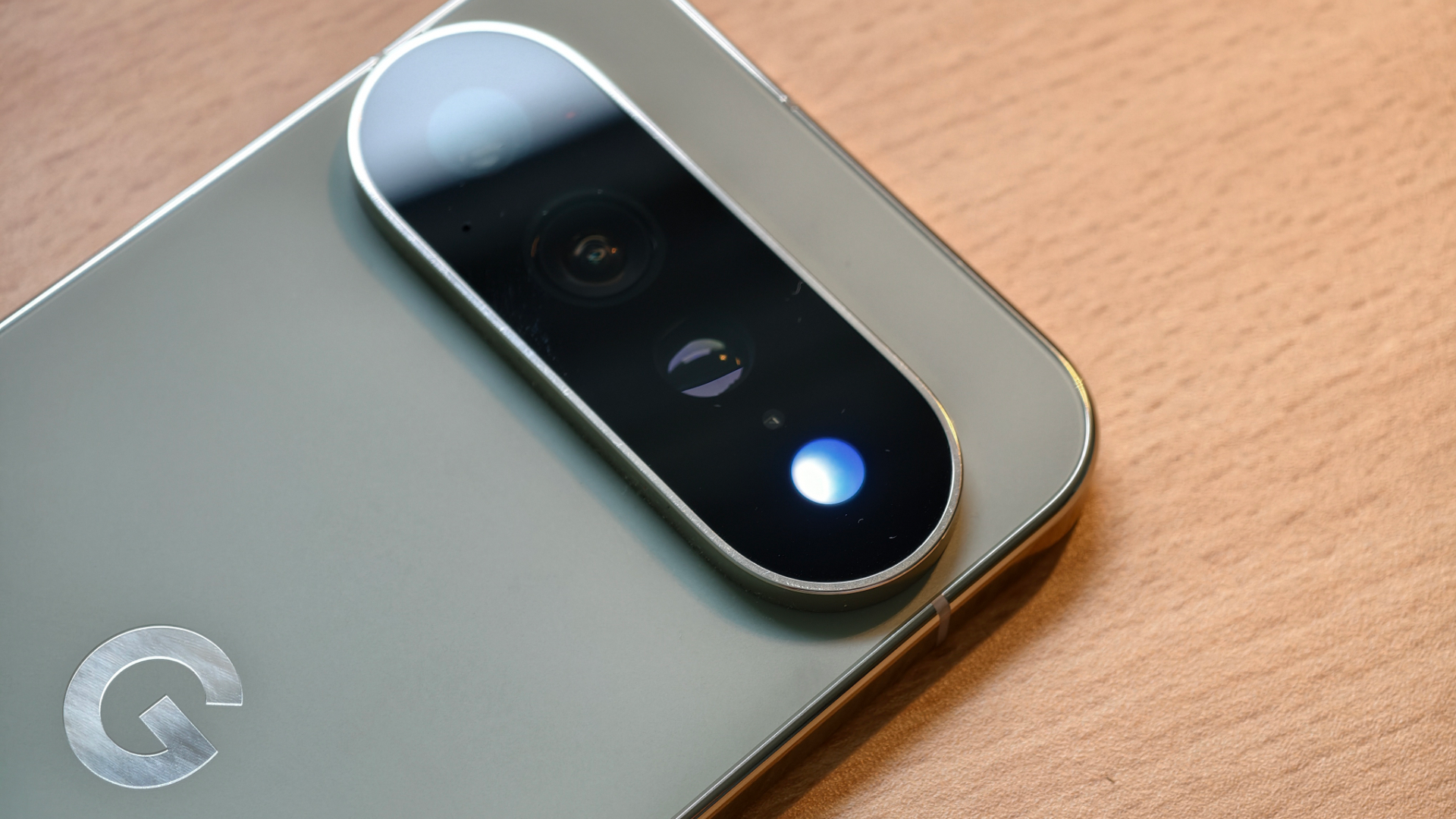
Google Pixel 11 Pro owners are finally seeing the HiLight notification light reach its potential. The November Pixel Drop brings meaningful improvements to this exclusive Pro model feature. HiLight uses the rear camera flash as a notification indicator when the phone sits face down on a desk or table. This subtle but practical feature addresses a common scenario where users miss alerts because their device screen is hidden.
What Is Pixel HiLight And How It Works
HiLight debuted on the Google Pixel 11 Pro and Pixel 11 Pro XL as a hardware feature built directly into the camera flash module. The concept is simple but clever. When your Pixel 11 Pro rests screen down, the LED flash pulses in different colors to signal incoming alerts. At launch, the feature only worked for favorite contacts calling and Google Gemini interactions. Many reviewers called it ‘half baked’ and questioned why Google bothered including the hardware without proper software support. The physical implementation uses the existing flash LED so no additional hardware cost was required.
Messages And WhatsApp Support Arrives
The latest Pixel Drop changes that equation significantly. HiLight now supports incoming messages from both Google Messages and WhatsApp. This means Pixel 11 Pro users can see who messaged them without picking up the phone. The feature activates automatically when the device detects a face down orientation using the built in accelerometer. Each contact or conversation can be assigned a distinct color from the available palette making it easy to identify senders at a glance. This works for both SMS and RCS messages in Google Messages as well as individual and group chats in WhatsApp.
Color Options Still Limited Despite Code Evidence
Android 17 QPR2 Beta 5 code discovered by Android Authority suggested Google planned to expand HiLight from five colors to nine. The additional shades would have included blue red and two green variants alongside the original teal yellow pink purple and white options. However, the November Pixel Drop did not deliver these extra colors. Users still have the original five color choices which limits customization for those with many priority contacts. Google has not commented on whether the expanded palette will arrive in a future update.
How To Enable HiLight Messages On Pixel 11 Pro
Pixel 11 Pro and Pixel 11 Pro XL owners can activate the new message alerts through the Settings app. Navigate to Notifications then select HiLight and toggle on Messages and WhatsApp individually. The system will prompt you to select colors for specific conversations or contacts. This granular control remains one of HiLight stronger points despite the limited color palette. You can also adjust pulse speed and brightness for different lighting conditions.
Pixel 11 Series Exclusive Feature Remains Pro Only
HiLight remains exclusive to the Pixel 11 Pro and Pixel 11 Pro XL. The standard Pixel 11 and Pixel 11a lack the necessary flash hardware configuration to support the feature. Google positioned this as a Pro tier differentiator alongside the telephoto camera and larger battery capacity. The November Pixel Drop also brought other improvements to the Pixel 11 series including camera tuning updates for low light photography and battery optimization tweaks for all models.
Room For Growth In Future Pixel Drops
While the Messages and WhatsApp addition makes HiLight genuinely useful, the feature still feels incomplete. The missing color expansion, lack of support for third party apps beyond WhatsApp, and absence of scheduling options suggest Google treats this as a ‘work in progress’. Pixel 11 Pro owners should keep an eye on future Pixel Drops for further HiLight enhancements. The hardware foundation is solid but the software experience needs more polish to match competitors like Samsung Galaxy S25 Ultra edge lighting or iPhone 16 Pro Dynamic Island notifications.




2 Comments